
 Have you ever moved or changed your phone number? You know how much of a hassle it is to update your information with your doctor’s office or insurance or bank.
When those moments arrive, you’ll be happy to know that Chase Bank tries to make the updating process as easy as possible. All you have to do is follow the steps below to change any of your personal info.
For those of you in need of a bank account, check out our review and get a hold of a coupon for the Chase Total Checking® account. For a more Premium option, see our breakdown of the Chase Premier Plus CheckingSM account and get a coupon to apply!
How to Update Your Personal Information
- Log in to Chase.com
- Locate the “Profile & settings,” tab at the top of the screen.
- Scroll down until you find the category “Personal details” Click on each section that you want to change as pictured below.
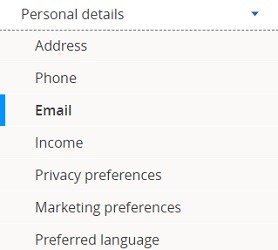
- If you want to change an address, click “Address” and select either:
- Add an address: Click “Add an Address,” then click “Permanent” or “Temporary.” Enter your new information in the fields provided. Use the drop-down list to indicate whether your address is in the United States or an overseas location. Finally, click the bank accounts you want to relate to this address, and click “make this my primary address” if this is your primary location. Click “Save” to submit your changes.
- Change an address: Simply click “Edit.”
- If you want to make changes to a phone number, click “Phone” and choose from:
- Add a phone number: Click “Add a Phone Number” and select “Home,” “Mobile” or “Work.” From there, select whether your number is domestic or international. Then, you can enter your number, and click “make this my primary phone number” if this is your primary phone. Click “Save” to submit your changes.
- Change a phone number: Click “Edit.”
- Remove a phone number: Click “Delete.”
- If you want to make changes to your E-Mail address, click “Email” and choose from:
- Add an e-mail address: Click “Add an E-mail Address” and enter your email address. Click “make this my primary e-mail address” if this is your primary email. Click “Save” to submit your changes.
- Change an e-mail address: Click “Edit.”
- Remove an e-mail address: Click “Delete.”
- Notes: Keep in mind that if you update your email, you will no longer receive emails from your bank from the previous address. Also, if you choose to not receive offers from Chase, this setting may not carry over to your new email.
- Change your personal information and confirm.
Chase Promotions
 • Earn up to $500 when you open a new Chase Business Complete Checking® account. For new Chase business checking customers with qualifying activities. • Choose Chase Business Complete Banking® to get a fully integrated business solution that can help you control costs. Waive the $15 Monthly Service Fee in multiple ways like keeping a minimum $2,000 balance, plus use built-in offerings such as card acceptance, invoicing, Chase Customer Insights and Tap to Pay on iPhone • Bank with confidence. Feel confident knowing we have the largest branch network in the U.S. with 5,000 branches that provide personalized service and can help with your complex banking needs. You can also benefit from our account protection services, which provide safeguards by overseeing employee account activity, monitoring checks, and offering additional protection for your business. • Access top-rated online business banking. Take advantage of our #1-ranked online small business banking platform with a comprehensive set of features designed for small business owners like you. Our tools enhance your ability to manage cash flow, accept and make payments, create invoices and plan for growth, so you can streamline processes and gain greater control of your finances. • More small business owners choose Chase than any other bank • The #1 choice for small business banking. |
 • New Chase checking customers can receive $400 when you open a Chase Total Checking® account and make direct deposits totaling $1,000 or more within 90 days of coupon enrollment. • Unlock more offers with Chase. Get up to $500 per calendar year by referring friends and family. Plus, get cash back from top brands with Chase Offers when you use your debit card. • Chase Total Checking® has a $15 monthly service fee, you can easily avoid the fee with direct deposits totaling $500 or more, or a minimum average daily balance each statement period. • Chase Overdraft AssistSM – no overdraft fees if you’re overdrawn by $50 or less at the end of the business day or if you’re overdrawn by more than $50 and bring your account balance to overdrawn by $50 or less at the end of the next business day* • Chase Mobile® app makes banking simple. Manage accounts, pay bills, send money to friends with Zelle® and deposit checks on the go with Chase Quick DepositSM . • Chase has the largest branch network in the U.S. with thousands of ATMs and branches. Use the Chase locator tool to find a branch or ATM near you. • Chase helps keep your money protected with features like Zero Liability Protection, fraud monitoring and card lock. • Chase Total Checking includes FDIC insurance up to the maximum amount allowed by law. *With Chase Overdraft AssistSM, we won’t charge an Overdraft Fee if you’re overdrawn by $50 or less at the end of the business day OR if you’re overdrawn by more than $50 and you bring your account balance to overdrawn by $50 or less at the end of the next business day (you have until 11 PM ET (8 PM PT) to make a deposit or transfer). Chase Overdraft Assist does not require enrollment and comes with eligible Chase checking accounts. |
 • Earn up to $3,000 when you open a new Chase Private Client CheckingSM account with qualifying activities. • Your dedicated banker and a J.P. Morgan Wealth Management advisor work as a team, providing personalized wealth strategies and one-on-one guidance to help plan your future with more confidence. Your team can also connect you to other specialists like a home lending advisor or business relationship manager. • Your J.P. Morgan advisor builds a custom wealth strategy that changes as you do, providing one-on-one guidance to help you make informed decisions for your future. • Get the added benefit of 24/7 customer service to help you manage your accounts. Enjoy waived fees on wire transfers and ATM withdrawals worldwide with the advanced security and protection you expect from a global leader. • Earn $1,000 when you deposit $150,000 or earn $2,000 when you deposit $250,000 or earn $3,000 when you deposit $500,000+. • Get up to a $3,000 bonus when you open or upgrade to a Chase Private Client account, a premium checking account which provides you with a dedicated banker and receive investing guidance from J.P. Morgan Wealth Management to help you reach your financial goals. • Bank deposit accounts, such as checking and savings, may be subject to approval. Deposit products provided by JPMorgan Chase Bank, N.A. Member FDIC. |
 |
 |
 |
Bottom Line
If you follow the simple steps above, you can easily change your personal information with Chase. They have made the process of changing your personal information much simpler with the new updates to their account website.
Now, everything is right in front of you, all on the sidebar. The next time you move or change numbers, you will be totally prepared. If you want to hear about all that Chase has to offer, head to our full list of the latest promotions from Chase Bank for all your banking needs.



Text me I’ll help you
Just need to change my address
I need to change my MAILING ADDRESS, how can i do it?
think i will use a good bank.
Yea change my address so I can pay you
Trying to change my address.
i want to find out when i have changed the address for my mails and how many times.
I Want to change my address
trying to change to new e-mail,
I’m trying to put a chance of address and phone number and everything else comes up. And I’m very upset